Showing posts with label Facebook. Show all posts

Friday, 15 May 2015

How to create fan page on facebook

How to create a fan page facebook is easy and free, but not easy to get a lot of likes from others , unless we use third-party applications or websites or such kind of programs that a hacker can get likes fast , but it is an illegal act and violated the facebook terms and might your facebook account will be banned.


Facebook fan page is required and there are also there is saying that the facebook fan page is essential to promote a product or industry and non- industry company , big or small that company our products can be found and known by many people .


And more features from faceebok fan page now the url facebook fan page we can setting to our name page so the url will be shortening for example our facebook fan page name is www.facebook.com/page/kelxntxng/120993 so long and difficult to remember, now ca be shortened to www.facebook .com/kelxntxng, besides can be shortened fan page facebook just created can be indexed by google also.


How to create a fan page facebook :


1 . Log in to facebook .


2 . Then pull down tool bar on the right of your facebook site and there will be found a link "create page" you must fast to click on it or click here create facebook page.


create a fans page facebook


3 . After entering and create your own page with section select what is to be made , there are places or local businesses , companies , organizations and more. See the picture below.


creating facebook likes page


4 . Click one of the choices to be made as example local business then it looks like the picture below, fill with your own name page for facebook page :


creating and field your facebook name


5 . After the box finish to fill of your own business name, address etc then we check the "I agree of facebook pages terms" and click get started button, will be taken to the next page that is part of your business or categories to fill whatever it is as shown below :


facebook page contents category field


6 . After the box finish to fill and the name of your web if you have, click save info button and the new page to fill your profile picture and upload your photo to be used as your profile picture on facebook fan page if it is uploaded click save and then skip to straight to the page or to the facebook fan page .


7 . Start and follow the instructions that will be given by facebook.

8 . To add a photo and a profile photo for facebook cover page should match the size of the image suggested by facebook for a profile :


  • When uploading photo profile received a message like this " The image you tried to upload is too small . It needs to be at least 180 pixels wide . Please try again with a larger image . " This means that in the image are too small try to view or upload images bigger than image before.

  • If you add a photo cover and when uploading in facebook page and receive the error message " Your cover photo needs to be at least 399 pixels wide . Please choose a different image . " Try to increase the size of the image size should be made to add a cover page on facebook fans is around 840 x 349 or 315.


9 . The last part is the hardest part of finding the "likes" for your own fan page, try to invite your friends to like your facebook fan page.


Once we have a fan page facebook and have a lot of members or who like our page then the next step is that we can promote to do business online, and we were able to get a lot of benefits that can get.

Thursday, 19 March 2015

How To Change Facebook Profile Name Before 60 days Limit


Every Facebook user have a same intention for example we want ours friends to do comments, likes on our status and pics. In the same way we use different types of names to make profiles unique and attractive.. But the problem which we face on Facebook is, We can't able to make changes in name after limit. Facebook also provide official form to But the new issue arise by Facebook is we can't even able to change name below 60 days once we done it.


Steps To Change Facebook Name Before 60 Day's Limit


  • First of go to 'Account settings' and click on 'Edit name' and confirm that Limit is currently present or not.
  • If the limit will be present Name will not be clickable and there should be a note about name change limit Which looks like.
You can't change your name right now because you've already changed it within the last 60 days. Learn more.

    • After checking out limit if you want to continue to change name then Click Here
    • Click on the Continue button. This link is actually for securing and recovering account from hacked. So we will use it to recover our account and it will let us to change name in further steps.


    • Change your Account password and but don't need to change any other information like email, mobile no etc.
    • After continuing they will show that you have recently changed your account name.
    • Then all the previously used names will displayed and select any of the listed name available there.

    Note:- By Using this method you can change name infinite time whenever you want but the limitation is that we cannot able to use new name. 

    I hope you enjoy this trick and don't forget to share this with others also.

    Sunday, 22 February 2015

    Facebook Page Rename Trick 2015

    New Way Of Changing Facebook Page Name Trick. Just follow easy steps By Steps Actually its not really official, Means its official but not for all countries, Its only for US and some countries, But we are using this by changing our computer IP address.


  • Open your Google Chrome Browser.                                                                      
  •              Chaning FaceBook Page Name                                      
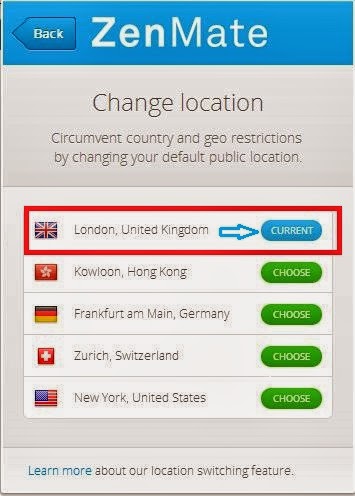
  • Simple Install Zen Mate Extension in Chrome.
  • Now Input Your email and it will give you the password.
  • Now Just restart your Google Chrome Browser.
  • After restart just change Your Locations To USA location in Zen met.                   
  •                          Chaning FaceBook Page Name                                                 
  • Now simply login in Your Facebook account.
  • Now Goto Desire page and click on Update Info.                                                 
  •               Chaning FaceBook Page Name                                     
  • Now Click on Change name or Edit option.
  • You will see Request Change Option click on it.
  • Then Now a new window open Automatcally.                                                        
  •                Chaning FaceBook Page Name                                     
  • I Need To Change the name of My Page.
  • Just Choose any of these or you require.
  • Now Fill Old Page name and Give New Name.
  • Input Your Identity Of Government Issued Ids                                                       
  •                   Chaning FaceBook Page Name                                             
  • After all Just scan this and send it to Facebook using this.
  • Now its done Facebook team will reply for Name Changed
  • Saturday, 21 February 2015

    Change Your Name on Facebook After Limit 2015

    So today, iam going to share facebook trick which is Change Your Name on Facebook After Limit 2015, Mostly many people dont know that facebook keeps some name limits for Pages, Profiles, Groups , Friends, Events etc. Just like we cant change facebook profile name after 5 times, we cant change our profile username more than 1 time, we cant change a facebook page name after 200 Likes, we cant change facebook group name after reaching 250 members,
    we cant add more than 5000 friends to our facebook profile and it is not possible to change the name of an event if it has more than 5,000 people invited.In these days, Many people are keeping Facebook Account Names in Different stylish Fonts, But Facebook is Banning the Accounts who using those type of stylish fonts, fake names.


    Change Your Name on Facebook After Limit 2015

    Also make sure that your name can’t include

    • Titles of any kind (ex: professional, religious, etc)
    • Symbols, repeating characters or punctuation, unusual capitalization and numbers
    • Words, phrases, or nicknames in the place of a middle name
    • Offensive or suggestive content of any kind
    • Characters from multiple languages
    As per Facebook Rules, the profile name you use should be your real name as it would be listed on your credit card, student ID, govt-issued proof etc. So I personally suggest everyone to keep your facebook account of real name without any fonts or special characters.
    So if your profile name limit is exceeded and want to change your facebook profile name to your real name, then Click Here.
    Fill that form and you have to upload your valid Government-issued Proof – photo ID like a Driver’s License or Passport etc and after your upload finishes, finally click “Send” button.
    Any One Proof will be enough in the list of below examples,

    For Examples

    • Birth certificate
    • Marriage certificate
    • Green card, residence permit or immigration papers
    • Personal or vehicle insurance card
    • Official name change paperwork
    • Non-driver’s government ID (ex. disability, SNAP or national ID card)
    • Voter ID card
    If you don’t have this, you can submit copies of any 2 other documents that together show your full name, birthday and picture.
    Choose Any Two Proofs will be needed in the list of below examples,

    For Examples

    • Credit card
    • Utility bill
    • School or work ID
    • Library card
    • Check
    • Bus card
    For more information about the Submission of Proofs, check out by Clicking Here.
    Before you submit your any valid ID proof, try to have a real picture on your Facebook Account because this may help you to get your name change fastly as facebook staff will consider your facebook account as real account.
    Note: Before you submit you valid ID, Facebook staff verified it and changed your name within 4-5 days. So I suggest you to take a clear picture of you proof either by Scanning or by capturing from a good camera or mobile. Above is the trick to change Your Name on Facebook After Limit 2015.

    How to Verify Facebook Page or Profile 2015

    How to Verify Facebook Page or Profile 2015
    Facebook recently introduce new feature to show that a page or profile is verified or not. As a normal Facebook user we all create account or page with our name and it is also possible to create multiple account on same name. Their are number of same name pages or account for any celebrity, public figure or for any business. So Facebook take serious step to make clear that which one is official and all the rest of others are not.
    This verification show that the page or profile your are visiting official represent someone or maybe a property of anybody. Facebook verify pages according to there online and offline presence. If you are real famous personally and well known by public then it will be very easy. Facebook verify pages for celebrities and public figures easily as compare to brand, websites based pages. So verification is just depend on our luck and popularity. For any famous celebrity you can't get his or her page verified until you are authorized representative or that celebrity manually submit request. So in this topic i will explain you both method for Automatic process and manual process and i hope this help you to understand in best way about verification.


    Facebook Page Verification method only four type of verification of pages or profiles in 2015 which are :-
    • Journalists
    • Popular Brand or Businesses
    • Government Officials
    • Celebrities

    These are the four categories of pages or profile which can be verified by Facebook with the new method of verification Facebook page or profile 2015. Suppose if you have any local business which is popular then Facebook may claimed your page if you are official. And then their is no need to submit any type of request to Facebook for page verification. They automatically claim your page as verified depend on some details and minimum requirements mention by Facebook.
    If you have pages mentions above there will be chances to get your page or profile is verified and your Facebook page must be official represent your local business or any personality and may be have some popularity on Facebook. when you create Facebook page fill all the real info about your or your business so Facebook will get to know that your real person. you need to follow some instructions :-
    -
    1. Link To Your Profile or Page From Official Website on your page or profile which you want to verify Facebook page 2015.
    2. Provide accurate information in details about your business in About Section of Page or Profile.
    In About section you must add :-
    • Significant long and short description,
    • Keyword who represent your business,
    • Email,
    • Official Website,
    • Products and
    • Verified Facebook Page Location with claimed business address
    • And Other details in Page Info tab.
    To send them Facebook page verification “Request a verified Badge” request you need to follow the link given below and fill the real information.

    Request for Facebook Page or Profile Verification 2015:-

    Open This link :-

    Facebook Mentions is only available to people with verified facebook profiles or Pages. To request a verified badge for your Page, please fill out this form. Fill in the required information and send request and than you are done.
    So here are the method to Verify Facebook page or profile 2015.If you face any problem Fell free to discuss in below comments and must share this article with your friends which want information about Facebook page verification any where in the web and help other to get this information share in your Facebook or in any social network stay tuned.

    Wednesday, 11 February 2015

    How To Create Single Name Account On Facebook - 2015


    Facebook is place where we share each and every, day to day incident with out friends, family in chat or status. Facebook is a biggest social media site with millions of daily users just because it has thousands of different features which make Facebook amazing. So Developers keep trying find to bugs to make Best Facebook tricks and funny pranks. I already post few amazing tricks like View Locked Facebook profile pictures and also safest method to changing Facebook theme and many more. But Some of them are just spam which may lead to compromise your account. So You try keep your account secure i recommend to read Best Facebook Protection Tips but we provide only safest way to enjoy Facebook. I always suggest each and every user to use tricks which are only provided by famous blogs. Always try them on Testing account first then on original ID.
    Now here i am going share another amazing Facebook tricks to make single Facebook account. As per rule it is not possible to Make account on Facebook without Last name. But if you want to make your Facebook profile with First name without using last name then simply follow my given steps.


    Steps To Make Single Name FB Account


    To make this article more simple. I divide this article into two parts so it will become easy to understand. In first part we will change our proxy settings for browser and in second part wemake our Facebook account name single. So follow both parts step by step carefully

         Part 1:- Proxy Settings For Browser


        • Install Hola Extension in Firefox or Chrome and then turn ON Hola and search and select Country Indonesia. 
        • It will automatically Implement proxy settings on your browser so you don't need to add proxies manually. 
        hola-country-settings


        Part 2:- Settings To Make Single Facebook Account


        • After doing proxy settings manually or by using Hola extension make sure it is working fine on Facebook.
        • Now its time to create single name id to do this.
        • Open your Facebook Account  Settings.
        • Change your language to Bahasa Indonesia.
        facebook-language-settings 
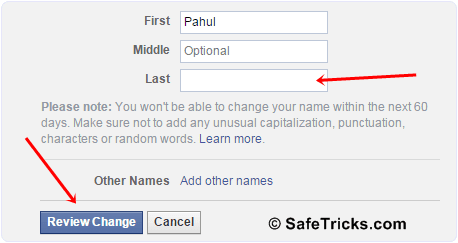
            • Then  edit your current Facebook profile name and Simply remove Your Last Name. After that review your name and Save it. 
            facebook-single-name-settings
              • After that your Facebook Account is only using First Name and you will see that Last Name Hide.
              • After Completing all steps, Remove Manual Proxy or Turn off Hola and change your language back to English (US) or other according to you. 
              Note:- Make Sure that You Don't had already changed your account name from last 60 days and otherwise you will not be able to make single name until you crossed 60 days time period. If you crossed name change limit then it is not possible try it on another account.
                I think there is no Need of Proof because our Tricks is working from Aug 2012 and our 200k+ users successfully make single name through our blog :) but if you want then check proof here

                Saturday, 10 May 2014

                FACEBOOK ACCOUNT BLOCKED REASON


                13 Reason Why Your Facebook Account
                Blocked :
                1. You didn’t use your real name.ok
                Facebook will find you and spit you
                out.
                2. You joined too many groups. (The
                maximum limit is 200 groups per
                user.)
                3. You posted too many messageson a
                wall or in a group. E.g. Guy Kawasaki
                had
                his account disabled–in his case for
                “excessive evangelism.”
                4. You posted in too many groups,too
                many user’s walls. (That’s what
                spammers
                do, silly.)
                5. You friended too many people. (Not
                so
                long ago this was a prime cause of
                disabled
                accounts, but Facebook has instituted
                a
                maximum of 5000 friends that should
                protect you
                from yourself.)
                6. Your school/ organization
                affiliation is
                doubtful.
                7. You’re poking too many people.
                (Beware
                the odd FB app that pokes on your
                behalf.)
                8. You advertised your app on
                wallposts.
                9. You used duplicate text in multiple
                messages.

                11. You are under 18 years old and
                not
                part of a High School group.
                12. You wrote offensive content.
                13. You scraped information off
                Facebook. E.g. Facebook bots disabled
                Robert Scoble’s account

                Tuesday, 4 February 2014

                Facebook 10th Anniversary Celebration [InfoGraphic]

                File--24.blogspot.com

                Facebook, the world’s most popular social networking website was born on February 4th 2004. 10 years on and the website is as strong as ever with over 1000million users. This number is phenomenal in itself but more so for the fact that the medium of social networking was largely unheard of until the early 2000s.


                While Facebook was not the first social network on the scene, it is certainly the one that all the others emulate in terms of its size. Growing from 1million users in 2004 to 6million in 2005 is a notable achievement at the outset of any company. This info-graphic explores the fascinating 10 year history of the success story that is Facebook. It covers what the interface looked like at inception stage and also charts the popularity of the social networking medium throughout the world. A closer investigation is taken at the numbers behind the company, addressing the 2012 initial public offering (IPO) and other interesting statistics. Revenue is paramount to all companies and this is examined for Facebook in the infographic also. An interesting comparison is also covered which pitches Mark Zuckerberg’s giant with another social networking power, Twitter.


                 photo facebook10yearsinfographic_zpse63b72e0.jpg

                Saturday, 4 January 2014

                Activate Facebook Log In Approval For Account Protection

                Today i am going to explain you another and extra feature which add best security layer toyour account for more protection. This method is Log in Approval method. This features is currently a testing features and only working for few number of countries like us, UK, Canada. In this protection features account need security code from your saved mobile number for every unknown or not saved active device. So here is the way to setup this feature for those countries where this protection is not available right know.


                Steps To Setup Mobile Log in Approval


                I am going to explain this process into two parts just follow them carefully

                Part 1:- 

                • If you are not from of US, UK, Canada or near countries then option will not appears inyour account settings. To get option you have to do some settings.
                • Firstly open Mozilla Firefox and Active Anonymox add-ons if you don't have already installed then download here
                • After installing anonymox click on the small new icon and tick them as Active. 
                OR 
                • If you face problem with Anonymox search any us or Canada proxy and add them in browser.
                • Tool >> Option >> Advance >> Network >> Settings and then add proxy with port and must tick use proxy for all protocol option also.

                Part 2:- 

                • After Following Part 1 make sure that your browsing is working fine with us, UK or Canada proxy.
                • Now Log in into your Facebook account >> Account Settings >> Security tab.
                 
                • If your proxy is working fine then the option will appear for Log In approvals
                • Before producing make sure that your mobile should added into your account.
                • Then tick into box and click on get started button.
                • Then select your mobile device type which your are using for that number. If android, iPhone or any smartphone then select or otherwise select others option and proceed.
                • Now code has been send on your mobile number simple note and enter them into box and click to continue button.
                • Then further is option if you want then tick them otherwise leave and click on close button.
                • Now log in approval protection is fully activated for your account.

                Some Important Tips:-

                1. In Log In approval their is option of Backup codes. simple get that 10 codes and note down it will helps you to log from unknown browser wherever you don't have mobile phone and always keep in mind never send your codes to anyone.
                2. Whenever you log in from unknown place where may or may not you open fb id again like in school, cafe. then after adding approval code then select don't save device option. Which means wherever someone want access from same browser again it need approval code.
                3. Try to activate other features like code generator as alternate if you have any smartphone. just because something if you mobile number will misplace or out of reach them it helps you to access.

                Sunday, 24 November 2013

                Nuovo firmware con Android 4.3 per Galaxy S4 No Brand

                jellybean 4.3

                E dopo il firmware con Android 4.3 Jelly Bean arrivato il mese scorso ecco ora disponibile una nuova versione per il Samsung Galaxy S4 No Brand Italia.

                Ecco il dettagli del firmware:

                • Model: GT-I9505
                • Country: Italy
                • Version: Android 4.3
                • Changelist: 2082040
                • Build date: 19-11-2013
                • Product Code: ITV
                • PDA: I9505XXUEMK8
                • CSC: I9505ITVEMK1
                • MODEM: I9505XXUEMK8
                • DOWNLOAD FIRMWARE

                Come al solito l’update è disponibile via Kies e via Ota. Se invece volete installarlo manualmente basta usare Odin (qui la guida).

                Nessuna nuova funzione da segnalare, solo bugfix e miglioramenti alla stabilità.

                Buon aggiornamento a tutti!

                AndroidPerTutti.com - L'originale, diffidate dalle imitazioni

                Articoli correlati:

                Monday, 16 September 2013

                How to create fan page on facebook

                How to create a fan page facebook is easy and free, but not easy to get a lot of likes from others , unless we use third-party applications or websites or such kind of programs that a hacker can get likes fast , but it is an illegal act and violated the facebook terms and might your facebook account will be banned.

                Facebook fan page is required and there are also there is saying that the facebook fan page is essential to promote a product or industry and non- industry company , big or small that company our products can be found and known by many people .

                And more features from faceebok fan page now the url facebook fan page we can setting to our name page so the url will be shortening for example our facebook fan page name is  www.facebook.com/page/kelxntxng/120993 so long and difficult to remember, now ca be shortened to www.facebook .com/kelxntxng, besides can be shortened  fan page facebook just created can be indexed by google also.

                How to create a fan page facebook :


                1 . Log in to facebook .

                2 . Then pull down tool bar on the right of your facebook site and there will be found a link "create page" you must fast to click on it or click here create facebook page.

                create a fans page facebook

                3 . After entering and create your own page with section select what is to be made , there are places or local businesses , companies , organizations and more. See the picture below.

                creating facebook likes page

                4 . Click one of the choices to be made as example local business then it looks like the picture below, fill with your own name page for facebook page :

                creating and field your facebook name

                5 . After the box finish to fill of your own business name, address etc then we check the "I agree of facebook pages terms" and click get started button, will be taken to the next page that is part of your business or categories to fill whatever it is as shown below :

                facebook page contents category field

                6 . After the box finish to fill and the name of your web if you have,  click save info button and the new page to fill your profile picture and upload your photo to be used as your profile picture on facebook fan page if it is uploaded click save and then skip to straight to the page or to the facebook fan page .

                7 . Start and follow the instructions that will be given by facebook.
                8 . To add a photo and a profile photo for facebook cover page should match the size of the image suggested by facebook for a profile :

                • When uploading photo profile received a message like this " The image you tried to upload is too small . It needs to be at least 180 pixels wide . Please try again with a larger image . " This means that in the image are too small try to view or upload images bigger than image before.
                • If you add a photo cover and when uploading in facebook page and receive the error message " Your cover photo needs to be at least 399 pixels wide . Please choose a different image . " Try to increase the size of the image size should be made to add a cover page on facebook fans is around 840 x 349 or 315.

                9 . The last part is the hardest part of finding the "likes" for your own fan page, try to invite your friends to like your facebook fan page.

                Once we have a  fan page facebook and have a lot of members or who like our page then the next step is that we can promote to do business online, and we were able to get a lot of benefits that can get.