Saturday, 21 February 2015

Change Your Name on Facebook After Limit 2015

So today, iam going to share facebook trick which is Change Your Name on Facebook After Limit 2015, Mostly many people dont know that facebook keeps some name limits for Pages, Profiles, Groups , Friends, Events etc. Just like we cant change facebook profile name after 5 times, we cant change our profile username more than 1 time, we cant change a facebook page name after 200 Likes, we cant change facebook group name after reaching 250 members,
we cant add more than 5000 friends to our facebook profile and it is not possible to change the name of an event if it has more than 5,000 people invited.In these days, Many people are keeping Facebook Account Names in Different stylish Fonts, But Facebook is Banning the Accounts who using those type of stylish fonts, fake names.


Change Your Name on Facebook After Limit 2015

Also make sure that your name can’t include

  • Titles of any kind (ex: professional, religious, etc)
  • Symbols, repeating characters or punctuation, unusual capitalization and numbers
  • Words, phrases, or nicknames in the place of a middle name
  • Offensive or suggestive content of any kind
  • Characters from multiple languages
As per Facebook Rules, the profile name you use should be your real name as it would be listed on your credit card, student ID, govt-issued proof etc. So I personally suggest everyone to keep your facebook account of real name without any fonts or special characters.
So if your profile name limit is exceeded and want to change your facebook profile name to your real name, then Click Here.
Fill that form and you have to upload your valid Government-issued Proof – photo ID like a Driver’s License or Passport etc and after your upload finishes, finally click “Send” button.
Any One Proof will be enough in the list of below examples,

For Examples

  • Birth certificate
  • Marriage certificate
  • Green card, residence permit or immigration papers
  • Personal or vehicle insurance card
  • Official name change paperwork
  • Non-driver’s government ID (ex. disability, SNAP or national ID card)
  • Voter ID card
If you don’t have this, you can submit copies of any 2 other documents that together show your full name, birthday and picture.
Choose Any Two Proofs will be needed in the list of below examples,

For Examples

  • Credit card
  • Utility bill
  • School or work ID
  • Library card
  • Check
  • Bus card
For more information about the Submission of Proofs, check out by Clicking Here.
Before you submit your any valid ID proof, try to have a real picture on your Facebook Account because this may help you to get your name change fastly as facebook staff will consider your facebook account as real account.
Note: Before you submit you valid ID, Facebook staff verified it and changed your name within 4-5 days. So I suggest you to take a clear picture of you proof either by Scanning or by capturing from a good camera or mobile. Above is the trick to change Your Name on Facebook After Limit 2015.

How to Verify Facebook Page or Profile 2015

How to Verify Facebook Page or Profile 2015
Facebook recently introduce new feature to show that a page or profile is verified or not. As a normal Facebook user we all create account or page with our name and it is also possible to create multiple account on same name. Their are number of same name pages or account for any celebrity, public figure or for any business. So Facebook take serious step to make clear that which one is official and all the rest of others are not.
This verification show that the page or profile your are visiting official represent someone or maybe a property of anybody. Facebook verify pages according to there online and offline presence. If you are real famous personally and well known by public then it will be very easy. Facebook verify pages for celebrities and public figures easily as compare to brand, websites based pages. So verification is just depend on our luck and popularity. For any famous celebrity you can't get his or her page verified until you are authorized representative or that celebrity manually submit request. So in this topic i will explain you both method for Automatic process and manual process and i hope this help you to understand in best way about verification.


Facebook Page Verification method only four type of verification of pages or profiles in 2015 which are :-
  • Journalists
  • Popular Brand or Businesses
  • Government Officials
  • Celebrities

These are the four categories of pages or profile which can be verified by Facebook with the new method of verification Facebook page or profile 2015. Suppose if you have any local business which is popular then Facebook may claimed your page if you are official. And then their is no need to submit any type of request to Facebook for page verification. They automatically claim your page as verified depend on some details and minimum requirements mention by Facebook.
If you have pages mentions above there will be chances to get your page or profile is verified and your Facebook page must be official represent your local business or any personality and may be have some popularity on Facebook. when you create Facebook page fill all the real info about your or your business so Facebook will get to know that your real person. you need to follow some instructions :-
-
1. Link To Your Profile or Page From Official Website on your page or profile which you want to verify Facebook page 2015.
2. Provide accurate information in details about your business in About Section of Page or Profile.
In About section you must add :-
  • Significant long and short description,
  • Keyword who represent your business,
  • Email,
  • Official Website,
  • Products and
  • Verified Facebook Page Location with claimed business address
  • And Other details in Page Info tab.
To send them Facebook page verification “Request a verified Badge” request you need to follow the link given below and fill the real information.

Request for Facebook Page or Profile Verification 2015:-

Open This link :-

Facebook Mentions is only available to people with verified facebook profiles or Pages. To request a verified badge for your Page, please fill out this form. Fill in the required information and send request and than you are done.
So here are the method to Verify Facebook page or profile 2015.If you face any problem Fell free to discuss in below comments and must share this article with your friends which want information about Facebook page verification any where in the web and help other to get this information share in your Facebook or in any social network stay tuned.

Adobe Photoshop Free Full Course In Urdu & Hindi

In This Course You Can Free Learn Complete Adobe Photoshop In Urdu And Hindi Language (Basic To Advanced Level) With Videos Tutorials. You Can Also Learn To Work On Default Tools, Text Effects, Default Filters And Blending. Following Are The Topics You Just Click On The Topic And Learn Photoshop Easily Through Videos .


NOTE : Courses Starting Withing 1 Week !
Stay Connected , And Share This Site With Your Friends .


Topic List (Click On Any Lesson And Watch Tutorial[Videos Coming])


  1. What Is Adobe Photoshop
  2. What Are Digital Images And Graphics
  3. Kinds Of Digital Images
  4. What is Color's Mode
  5. Tour Of Adobe Workspace
  6. Creating New Canvas Extra. Save Files
  7. Working With Option Bar
  8. Working With Tools Box
  9. Change Eyes, Tie & Background Color
  10. Smooth Skin
  11. Clean Moustache
  12. Clean Pimple
  13. Dream Effect
  14. Brush Stroke
  15. Change Dress Color
  16. Cutout With Hairs
  17. Create ID Card Photos Size
  18. Images Are Merging
  19. Black & White Image Convet Into Digital Image
  20. Clouds Effect
  21. Electricity Effect
  22. Fabric Effect
  23. Flag Effect
  24. Water Effect
  25. Planet Effect
  26. Stone Effect
  27. Create Brush
  28. Wire Effect
  29. Pattern Effect
  30. Candy Effect
  31. Fire Effect
  32. Grass Effect
  33. Cactus Effect
  34. O-Line Effect
  35. Urdu In PS
  36. 3D Effect
  37. Bakery Effect
  38. Digital Effect
  39. Glass Effect
  40. Gold Effect
  41. Image In Text Effect
  42. Lava Effect
  43. Marble Effect
  44. Metal Dark
  45. Metal Chrome Effect
  46. Neon Effect
  47. Pixel Effect
  48. Puncture Effect
  49. Soften Skin
  50. Panaflex

Share With Your Friends
And
Remember Me In Your Prayers

Tuesday, 17 February 2015

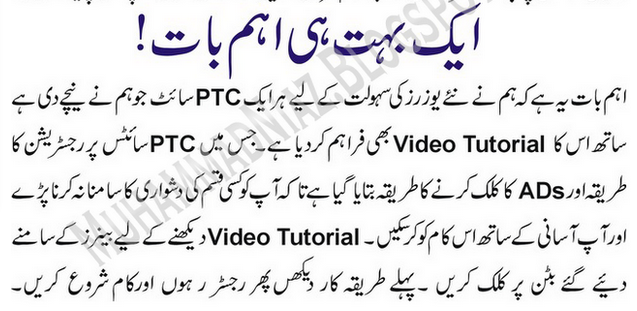
Earn Money Online With PTC Sites (Urdu Tutorial)

"Earn Money Online With PTC Sites (Urdu Tutorial) "
How To Earn Money With PTC Sites.
Its A Easiest Way For Earning Money In Any Country From Internet !
Its A Urdu Tutorial You Can See English Tutorial Here (Link Coming) 
Click Read more button below for full tutorial 


1

2

3


(Video Tutorial Coming)

Thursday, 12 February 2015

[光碟燒錄] BurnAware Free 7.9.0 繁體中文免安裝版

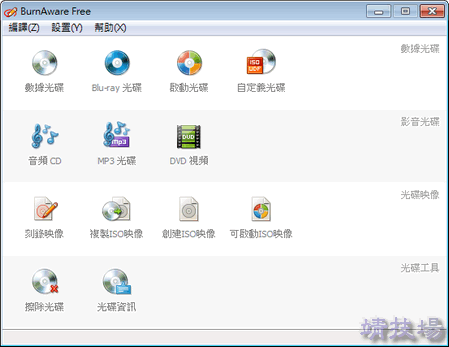
BurnAware Free」是款相當不錯的光碟燒錄工具,基本的燒錄功能都有喔,不管是CD、DVD、MP3、藍光、映像檔等都有支援,也支援Unicode字元,算是還蠻齊全的,而且專業版和家用版的功能其實我們也用不太到,個人使用的話用免費版就綽綽有餘了。[版本比較]

burn

[影音轉檔] Any Video Converter Free 5.7.8 繁體中文免安裝版

AVC02

Any Video Converter Freeware」 是一款具有多功能的免費視訊轉檔軟體。它無需支付任何費用,程式不含病毒,沒有使用期限,沒有工具欄, 承諾不會追加任何費用。(以下特色說明取自官網)

免費的全能視訊轉換器
支援超過60種視訊輸入格式,并轉換到wmv, mpg, mp4, avi, 3gp, 3g2, flv, mkv, swf, webm, html5 webm, html5 ogg, html5 mp4, mp3, ogg, wav, CD-R, CD-RW等格式。

免費從視頻中提取音頻
支持轉換MP4為MP3, 轉換MPEG為M4A, 轉換AVI為MP3, 轉換WMV為WMA, 轉換MOV為AAC等,將視訊檔案轉換為音頻檔案,還可以截取視訊片段進行轉換。

使用 Any Video Converter Freeware ,您可以進行(高清)視訊之間的轉檔,並能從影片中擷取音訊。這樣,您可以把影片轉換成可以在 iPod、 iPad、 iPhone、 Android 等設備播放的視訊格式,隨時隨地觀看影片不再是難事!

多輸入格式支持
3g2, 3gp, 3gpp, 3gp2, amv, asf, avi, avs, dat, divx, dv, dvr-ms, f4v, flv, m1v, m2p, m2t, m2ts, m2v, m4v, mkv, mod, mov, mp4, mpe, mpeg, mpeg2, mpeg4, mpg, mpv, mts, nsv, ogg, ogm, ogv, qt, rm, rmvb, tod, trp, tp, ts, vob, vro, wmv, webm等。

多輸出格式支持
視訊: wmv, mpg, mp4, avi, asf, m2ts, 3gp, 3g2, flv, mkv, swf, webm, html5 webm, html5 ogg, html5 mp4等。
音訊: mp2, mp3, ogg, wav, aac, m4a, wma, ac3, au, aiff, dts, flac等。
DVD: CD-R, CD-RW, DVD-RAM, DVD+R, DVD+RW, DVD+R Dual Layer, DVD-R, DVD-R Dual Layer

自定義參數
自定義幀大小,視頻比特率,音頻比特率,視訊編碼器等,支持直接手動輸入。

多設備支持
支持將各種視訊檔案轉換到PC,筆記本電腦,平板,蘋果iPad,iPod,iPhone,索尼PSP,三星,HTC,TCL,Android,黑莓,諾基亞,微軟Xbox,智能手機等移動設備以及各種播放器中播放。

Any Video Converter Freeware 還是一款 YouTube 視訊下載&轉檔工具。您可以輕易地實現下載以及轉換 YouTube 視訊。您還可以把影片轉檔成 MP4 格式,上傳到 YouTube。另外,這套免費轉檔軟體還可以下載以及轉檔 Google 視訊和日本的 Nico 在線視訊。

內置YouTube視訊下載和視訊轉換
將在線視訊URL拷貝到內置下載器中進行下載,支持從主流在線視訊網站直接下載,包括:YouTube, Nico, Veoh, Facebook, MetaCafe, Vimeo, Howcast, LiveLeak, Vevo, Myvideo.de, MTV等。

選擇下載視訊品質
在線視訊下載時可以根據實際需要選擇視訊下載品質,主要影響為視訊清晰度。

設置MP4快速啟動
MP4快速啟動選項主要指於將帶有MP4快速啟動的輸出視頻上傳至網上時,該視頻可以在整個視頻文件被下載前就進行播放。

Any Video Converter Freeware 的影片編輯功能可助您實現將多個視訊合併成一個;裁切影片邊緣;剪輯影片片段。可裁切影片中某一小段;添加字幕等。您還可以調整影片的明亮度、對比度等。

合併視訊檔案
將多個視訊檔案合併為一個輸出。支持合併輸入格式不一樣的視訊檔案。

剪輯視訊片段
通過設置剪輯視訊片段的起點和終點,輕鬆將一個視訊檔案剪輯為多個視訊片段。

添加簡單的視訊效果
調整亮度,對比度,飽和度,旋轉或翻轉視訊,添加藝術效果或增強等,使視訊變得與眾不同。

添加水印
給視訊添加屬於你自己的水印。

添加字幕
可以使用自己準備的SRT格式字幕並嵌入到輸出視頻中,可以設置字幕位置,大小以及字體。

Any Video Converter Freeware 具有把視訊燒錄到 DVD、 CD 光盤的功能。您必須根據您的TV 系統選擇 “DVD video NTSC Movie” 或者 “DVD video PAL Movie ” 的輸出格式。

選擇DVD輸出格式
根據DVD播放器可以將視訊檔案轉換為:NTSC Movie, PAL Movie, AVCHD 720P Movie(*.m2ts) 以及 AVCHD DVD 1080P Movie(*.m2ts)。

支持燒錄視訊為多種可播放的DVD格式
CD-R, CD-RW, DVD-RAM, DVD+R, DVD+RW, DVD+R Dual Layer, DVD-R, DVD-RW, DVD-R Dual Layer

AVC01

相關下載:
[影音轉檔] FormatFactory 格式工廠繁體中文免安裝版
Freemake Video Converter 繁體中文免安裝版

Wednesday, 11 February 2015

Menlo、Meslo 程式設計師專用字型下載

前幾天有介紹過「MONACO」這個等寬字型,很適合寫程式的人來使用,而維基百科也提到,在Mac OS X 10.6的版本之後,原先Terminal的預設字體Monaco被更換成本文的主角「Menlo」,當然同樣是等寬字型,甚至還有人進行改良成「Meslo」字型,將LINE Gap放寬一點,不管是哪一種,我都建議寫Code的人可以試用看看。(source1source2)

下面就是這二個字型的示意圖,有沒有發現以上下行距來說,Meslo比Menlo好一點呢?

menlo

meslo

註:本文提供的下載檔案是適用於Windows平台,包含原始版本與改良版