Showing posts with label Tricks. Show all posts

Thursday, 26 February 2015

Android Secret Codes For Smartphones: (Hidden Codes Chart)

Android Secret Codes For Smartphones
Android is one the most popular smartphone OS ever. Developers creates various kind of backdoor within the applications and operating systems. Through these backdoor any users who have sufficient knowledge can get into the system much deeper as compare to other users. As we all know Android is an open source operating system based on Linux Kernel and developed by Google. An Android operating system is most widely used in the world.
Android developers also creates many backdoor through which you can enter into the system and you can change settings. It is not meant to be used these backdoor for malicious intent because developers blocked some modes and these backdoor are the way or allow the users to enter into the system and let you become familiar to the system. In smartphone these backdoor are called "secret codes". These are the numeric/symbolic sequences which allow you to access system settings for several uses. So here we collect some Secret Hidden Codes for Android. May be some of them not work on specific device but you can try it if you can !

Note:- Some of these codes can reason for serious changes on your device assortment so please be advised run these codes on your own risk and don't play with them if you don't have sufficient knowledge about them.    


Common Android Secret Codes


CodesFunctioning
*#*#7780#*#*
  1. Factory restore setting
  2. Clear all application and data.
  3. Remove Google account setting.
  4. Remove System, application data and settings.
*2767*3855#
  1. Reinstall the phones firmware.
  2. Used for factory format.
  3. Remove all files and settings including the internal storage.
  4. Reinstall the firmware.
*#*#197328640#*#*
  1. Enabling test mode for service activity.
  2. Used to enter into Service mode.
  3. You can run and change various tests and settings in the service mode.
*#*#4636#*#*
  1. Phone basic information.
  2. Phone usage detail.
  3. Battery information.
*#*#34971539#*#*
  1. Information about mobile camera.
  2. Get camera information.
  3. Note:- Please avoid update camera firmware option
*#*#7594#*#*
  1. Changing the power button behavior.
  2. Enables the direct power off without asking for selecting any option (silent mode, Aeroplane and power off).
*#*#273283*255*663282*#*#*
  1. Create backup to all your media files.
  2. Opens file copy screen where you can backup your media files like (images, videos and audios).
*#*#8255#*#*
  1. For Google Talk service monitoring.
  2. Used to launch G Talk Service Monitor.
*2767*4387264636*
    1. Used to display product code.
      *#0228#
        1. Used to know Battery Status.
          *#12580*369*
          1. Software and Hardware Info.
          *#32489#
          1. Let you know Ciphering Info.
          *#273283*255*3282*#
            1. Data create menu.
              *#3282*727336*#
                1. Data usage status.
                  *#8736364#
                  1. OTA update menu.


                  WLAN, GPS and Bluetooth Test Android Secret Codes


                  CodesFunctioning

                  *#*#526#*#*
                  *#*#528#*#* 
                  *#*#232339#*#*
                  1. WLAN Test.
                  *#*#232338#*#*
                  1. Displays/Shows WiFi MAC address.
                  *#*#1472365#*#*
                  1. For quick GPS test.
                  *#*#1575#*#*
                  1. Different type GPS test.
                  *#*#232331#*#*
                  1. Bluetooth test.
                  *#*#232337#*#
                  1. Displays Bluetooth device address.


                  Firmware version information Android Secret codes


                  CodesFunctioning
                   *#*#1111#*#*
                  1. Let you know about FTA SW Version.
                  *#*#2222#*#*
                  1. FTA Hardware Version.
                  *#*#4986*2650468#*#*
                  1. Firmware Info PDA, Phone, H/W, RFCallDate.
                  *#*#1234#*#*
                  1. PDA and Phone firmware info.
                  *#2263#
                  1. RF band selection
                  *#9090#
                  1. Diagnostic configuration.
                  *#7284#
                  1. USB 12C mode control.
                  *#872564#
                  1. USB logging control.
                  *#745#
                  1. RIL dump menu.
                  *#746#
                  1. Debug dump menu.
                  *#9900#
                  1. System dump mode.
                  *#*#44336#*#*
                  1. Shows Build time changelist number.
                  2. PDA, Phone, CSC, Build Time, ChangeList number.
                  *#03#
                  1. NAND flash serial number.
                  *#3214789#
                  1. GCF mode status.


                  Factory Tests Android Secret Codes


                  CodingFunctioning
                  *#*#0283#*#*
                  1. Packet Loop-back test.
                  *#*#0*#*#*
                  1. LCD test.
                  *#*#0673#*#*
                  *#*#0289#*#*
                  1. Audio/Melody test.
                  *#*#0842#*#*
                  1. Vibration test and Back Light test Device test.
                  *#*#2663#*#*
                  1. Displays Touch screen version.
                  *#*#2664#*#*
                  1. Touch-Screen test.
                  *#*#0588#*#*
                  1. Proximity sensor test.
                  *#*#3264#*#*
                  1. RAM version.
                  *#0782#
                  1. Real time clock test.
                  *#0589#
                  1. Light sensor test.
                  *#7353#
                  1. Quick test menu.


                  PDA and Phone Android Secret Codes


                  CodesFunctioning
                  *#*#7262626#*#*
                  1. Field test.
                  *#06#
                  1. IMEI number.
                  *#*#8351#*#*
                  1. Enables voice dialing logging mode.
                  *#*#8350#*#*
                  1. Disables voice dialing logging mode.
                  **05***#
                  1. Execute from Emergency dial screeen to unlock PUK code.
                  *#301279#
                  1. HSDPA HSUPA control menu.
                  *#7465625#
                  1. View phone lock status.


                  Other Android Secret Codes


                  CodesFunctioning
                  *#0*#
                  1. Galaxy S3 service menu.
                  ##7764726
                  1. Motorola DROID hidden service menu.
                  2. The default SPC password is six zeroes(000000).
                  1809#*990#
                  1. LG Optimus 2x hidden service menu.
                  2. When prompted for a code enter six zeroes(000000).
                  3845#*920#
                  1. Lg Optimus 3D hidden service menu.
                  2. When prompted for a code enter six zeroes(000000).


                   All the above given codes are tested and working fine but codes may not works single device. You can just try find which work or which not. Be alert while using them we are not responsible for any data loss or other problem. If you had any problem while trying must leave your comment.

                  Monday, 9 February 2015

                  How To Transfer Data From Android To PC/Laptop Using WIFI

                  How To Transfer Data From Android To PC/Laptop Using WIFI
                  Many times we need to transfer data from our phone to PC/Laptop or vice verse because of to save our personal photos, audios, videos and other files in PC/Laptop or mobile phone. In every day we often connect our phone to computer with the help of USB. But you cannot carry or have USB all the time with you but any situation or time when you have to need to transfers data from computer/laptop to your phone  or vice verse in college or any other place then it becomes difficult for it.But don't worry there is always a solution of every problem so that for this problem a Software Data Cable app is designed for android users to transfers the data from mobile phone to computer or computer to mobile phone without any use of data cable. This app is free of cost and you can download it from Google play store. With the help of this app it becomes easy, fast and secure way to to transfers data.  This app can Connect and share everything among phones, Pad, Google TV, Cloud storage, Xbox, PC, Mac, Laptop etc. So here is a simple steps to download and transfers data from android phone to PC/Laptop or vice verse without using data cable.

                  Steps To Transfers Data From Android Phone To PC


                  #1. First of all you have to an same WiFi network connection on computer or your android phone.
                  #2. Then simply Download the Software Data Cable app from Google Play Store.


                  download-Pepsi-Skate-3D
                  download-Pepsi-Skate-3D-sync-data

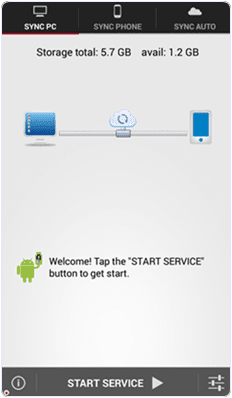
                  #3. Install the app in your android phone and click on start service.

                  download-Pepsi-Skate-3D-ip-address

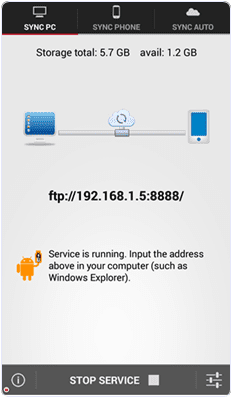
                  #4. Then it will show you ftp://192.168.1.5:8888 address, simply copy the address or fill into your computer address bar and click OK. It will show you storage folder where your all files stored now  you can transfers the data from your android phone to computer or vice verse.
                  ip-address-in-my-computer
                  I hope you like this method and find easy to use. In case you have any question please leave your comments below.


                  Thursday, 11 July 2013

                  Change Windows XP Service Pack 2 to Service Pack 3 Without Installation

                  Change Windows XP 

                  Service Pack 2 to Service Pack 3 without Installation


                  Hi to all. Here I am going to share a method to change windows xp service pack 2 to service pack 3 within just a minute.
                  We all must have come across a situation when we would be requiring Windows XP service Pack 3 to run some applications or due to some other reason but we may be running Service pack 2. I have also come across this situation and then I googled it and found a very simple solution to this problem. so Here I am sharing this trick with you all.

                  Change Windows XP Service Pack 2 to Service Pack 3

                  change windows xp service pack 2 to service pack 3
                  1. First go to run by clicking on the start menu or simply pressing Windows + R button on Keyboard.
                  2. Now type regedit in  the run box and hit enter.
                  3. Make a backup of your registry (just in case)
                  4. Browse to “HKEY_LOCAL_MACHINE\SYSTEM\ CurrentControlSet\ Control\ Windows”
                  5. Modify the value of “CSDVersion” from “0×00000200″ (SP2) to theWindows XP SP3 value of “0×00000300″
                  6. Now close the Registry editor window and Reboot/Restart yourcomputer.
                  7. After restarting your PC Check Your PC properties , It will be showingWindows XP service Pack 3.
                  Now I will explain you what we did now…

                  When we changed the value of CSD Version from 200 to 300. It makes the OS think that it is Service Pack 3. And thus if you install any program requiringWindows XP service Pack 3 and up then that program will also think that it isWindows XP 3.  So now you know how to change Windows XP service pack 2 to service pack 3 So use this trick to fool Windows and enjoy....